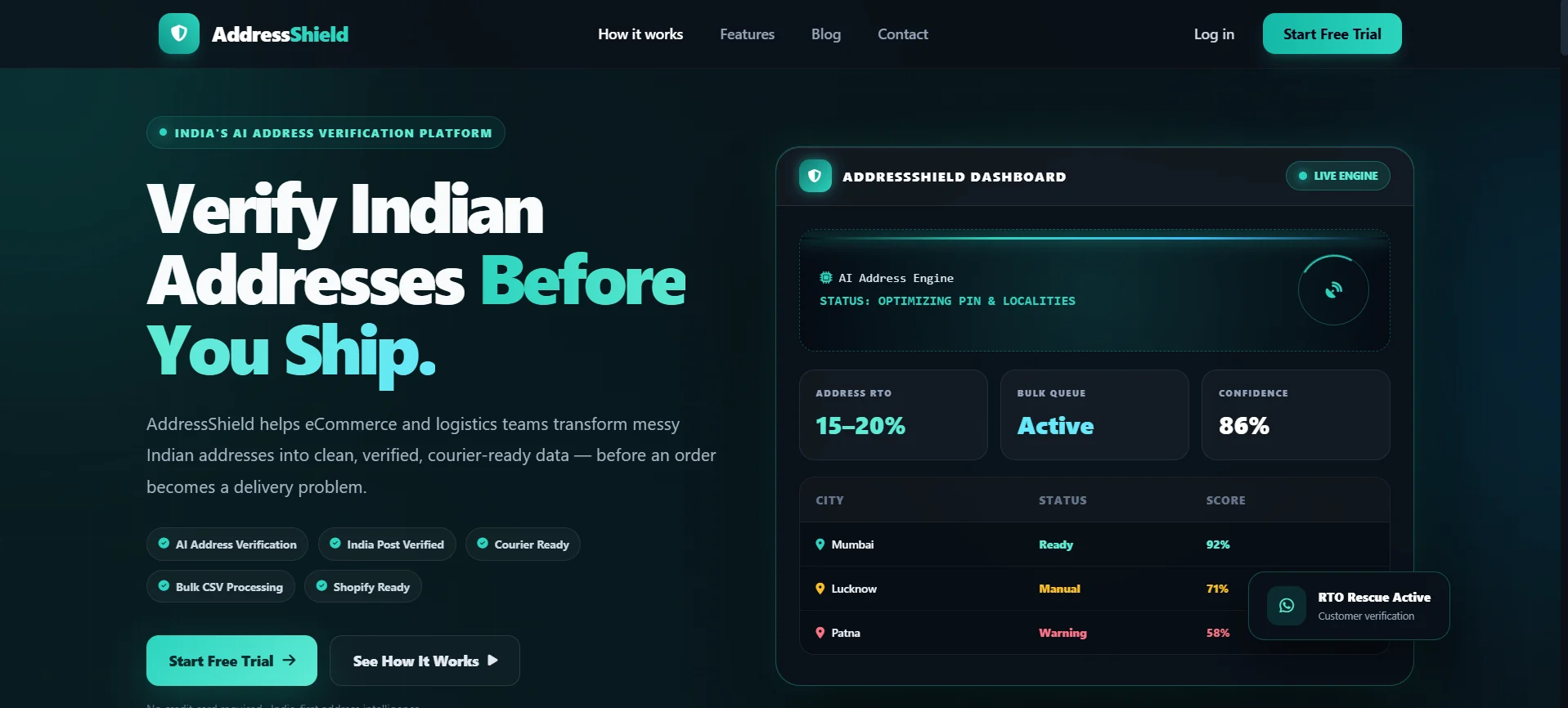
AddressShield is our AI address verification platform for Indian e-commerce sellers. Upload your orders in Excel, and every address is checked against India Post and Google Maps, corrected, rewritten for the delivery partner — and fake or risky orders are separated before you ship.
h no 12 gali 3 nr hanuman mandir shastri nagr jaipur 302016
AI · India Post · Google Maps
Courier-ready address
H.No 12, Gali No 3, Near Hanuman Mandir, Shastri Nagar, Jaipur, Rajasthan – 302016
Pin code
302016
City
Jaipur
State
Rajasthan
District
Jaipur
Landmark
Hanuman Mandir
Status
Ready
Illustrative example
FAKE ORDERS FILTERED
READY TO SHIP
Pin-code validationDistrict & post office matchLandmark detectionFake address filterDuplicate order checkAny language to EnglishBulk Excel uploadCourier-ready formatPin-code validationDistrict & post office matchLandmark detectionFake address filterDuplicate order checkAny language to EnglishBulk Excel uploadCourier-ready format
What is AddressShield
An address verification engine built for Indian e-commerce.
Most orders that come back were lost at the address. AddressShield checks every address in your order file, repairs what can be repaired, and tells you which orders you should not ship blindly.
You upload an Excel sheet of orders. Our engine uses AI, the India Post API and Google Maps to validate each address, fix what is fixable, and flag what cannot be trusted — in one batch, not one order at a time.
Why we built it
Because sellers pay for every return
Sellers kept losing money on parcels that never reached the customer — wrong pin codes, half-written addresses, fake names and numbers, spam orders. We built a way to catch these problems before the parcel leaves your warehouse, not after it comes back.
Who should use it
Anyone who ships across India
D2C brands, marketplace sellers, COD-heavy stores, dropshippers and logistics teams — anyone who pays for failed deliveries and wants a higher share of orders to reach the customer on the first attempt.
The problem
RTO is the quiet leak in every seller’s profit.
Return to Origin (RTO) happens when a courier cannot deliver your parcel and sends it back. You pay the shipping both ways, and the sale is gone.
Order placed
Customer enters an address and mobile number.
You pack & ship
Cost of packing and forward shipping is spent.
Delivery fails
The partner cannot find, reach or deliver to the customer.
Parcel returns
The shipment travels all the way back as RTO.
You take the loss
Shipping, stock and seller score all take a hit.
Wrong or incomplete address
House number, locality or landmark is missing, so the delivery partner cannot find the door.
Wrong pin code, city or state
The pin code does not match the locality, so the parcel is routed to the wrong hub and goes astray.
Fake name and fake mobile number
Calls go unanswered or reach a stranger, and nobody turns up to accept the parcel.
Spam and test orders
Prank, bot or competitor orders that were never meant to be received are shipped like real ones.
Hard-to-read local addresses
Addresses written in regional languages or mixed scripts that systems and partners struggle to read.
Duplicate orders
The same order punched twice by mistake, or one buyer placing repeated orders on suspicion.
What one RTO really costs you
Orders with a wrong or fake address rarely reach the customer — the chance can be as low as 20% or less. Every miss adds up, and repeated returns also damage your seller rating on marketplaces.
Forward shipping
Return shipping
Packaging
Damaged or lost stock
Wasted ad spend
Lower rating & seller score
How it works
From messy order sheet to courier-ready data.
Four automated stages run on every row of your file. You upload once — the engine does the checking, fixing and sorting.
Stage 1
Upload your Excel
Fill our simple template with your orders and upload it. No integration or developer needed.
Stage 2
AI reads every address
Understands abbreviations, spelling mistakes and mixed scripts, and converts other languages into readable English.
Stage 3
Verified on real data
Cross-checks against the India Post API and Google Maps to confirm the pin code, locality and location.
Stage 4
Sorted into four files
Correct addresses are rewritten in a clean format. Risky ones are separated so you can verify them first.
What gets verified on every address
Each field is matched against official and map data, then corrected where the data is wrong or missing.
Pin code
City
State
District
Post office
Landmark
Village
Block
Locality
Mobile number
Courier-friendly rewriting
Correct addresses are not just approved — they are rewritten in a clean, readable format, with extra local context added so the delivery partner can find the place quickly.
Fake address separation
Addresses that look fake, incomplete or inconsistent are moved out of the ready list, so they are checked by a human before any parcel is sent.
All-India, any language
Works for addresses across India. Addresses written in other languages are converted into readable English for your team and your couriers.
What you get
Four result files. One clear action for each.
After validation, every batch is split so your team knows exactly what to ship, what to call and what to cancel.
Ready
Verified, complete and rewritten in a courier-ready format.
What to doDownload the file and ship these orders with confidence.
Manual
The address looks wrong, incomplete or fake, so it should not be shipped blindly.
What to doCall the customer to verify, then ship — or cancel if it does not check out.
Repeated User
The same mobile number placed another order within the last 15 days.
What to doVerify with the customer. It may be a genuine re-order — or a suspicious pattern.
Repeated Order
The same order ID appears more than once, usually a mistake in the sheet.
What to doCheck it, cancel the duplicate, and ship only the correct order.
Download each file separately from the History Log page of your dashboard.
Why use it
See the difference verification makes.
The difference shows up in your return rate, your rating and the hours your team spends on avoidable problems.
Without verification
With AddressShield
Address quality
Raw text as the customer typed it, with spelling mistakes and missing details.
Validated, corrected and rewritten in a clear, courier-friendly format.
Fake & spam orders
Shipped like any other order and discovered only when they return.
Separated into a manual-verification list before shipping.
Delivery partner
Struggles to find the location and makes multiple failed attempts.
Gets a readable address with local context, so the first attempt can succeed.
Duplicates
Repeat and duplicate orders slip through unnoticed.
Repeated users and repeated order IDs are flagged automatically.
Delivery success
Bad-address orders have a very low chance of reaching the customer.
Verified addresses can reach up to 99% delivery chance.
Your team’s time
Calling every customer, or none at all.
Calls only where they are needed — the Manual list.
Lower RTO costs
Fewer returned parcels means less money spent on shipping that earns nothing.
More first-attempt deliveries
Clear addresses let the delivery partner reach the customer faster.
Better ratings & seller score
Fewer failed deliveries and cancellations protect your reputation on marketplaces.
Built for bulk
Check hundreds of orders in one upload instead of reviewing them one by one.
Works with any courier
Export orders from any store or marketplace panel into the template — no integration required.
Made for teams
Admins can add users and control which pages each person can access.
Step-by-step guide
Get from sign-up to shipped orders in minutes.
Follow the screens below. The glowing outlines show exactly where to click — tap any screenshot to enlarge it.
Step 01
Open the portal and start your free trial
Visit rto.nxtlift.in. If this is your first visit, create your account with the Start Free Trial button.
1Click Start Free Trial (the button in the header or in the hero section both work).
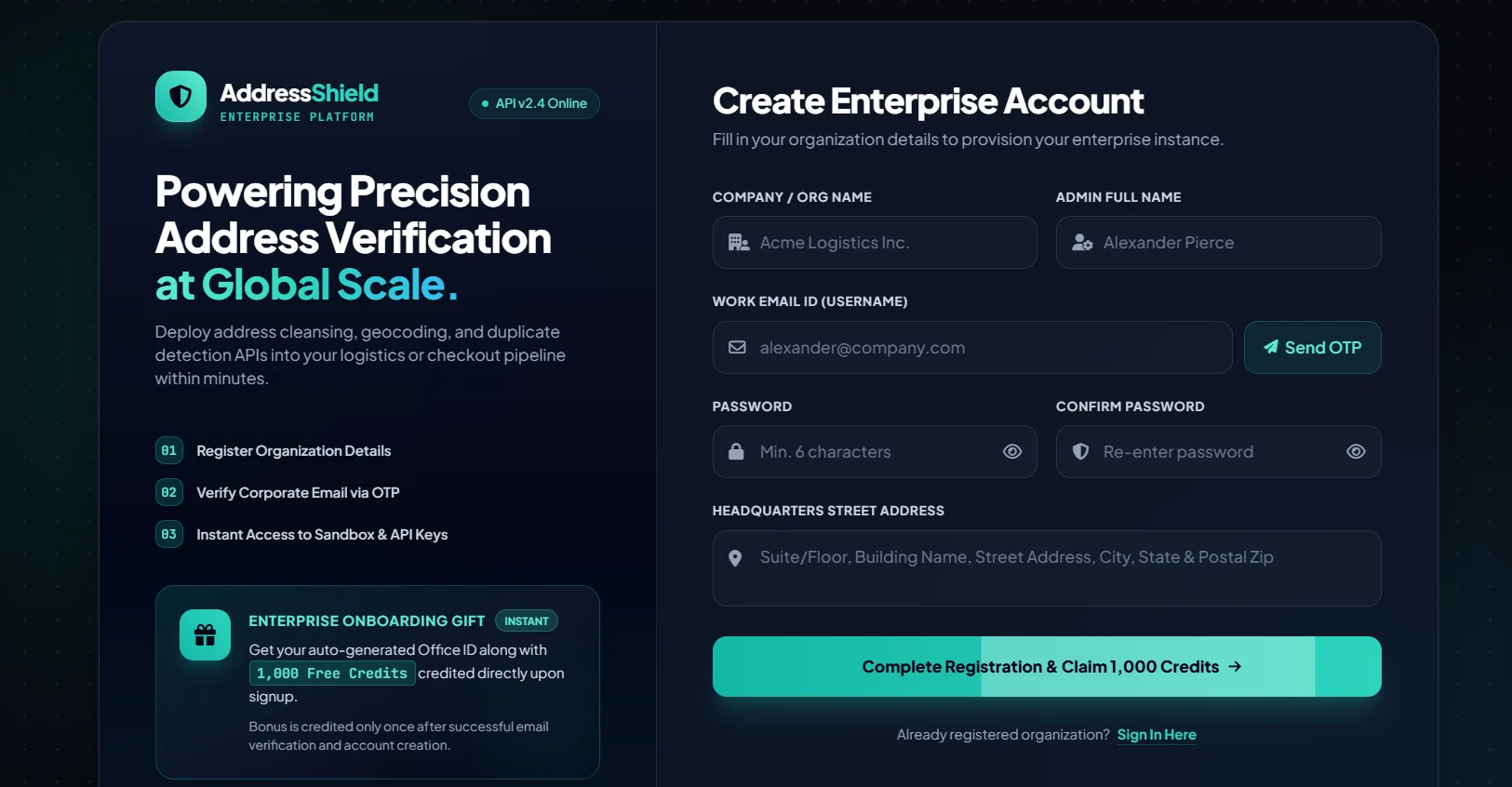
Enter your company name, admin name, work email, a password (minimum 6 characters) and your headquarters address. We verify your email with a one-time password before the account is created.
1Type your work email — this becomes your username.
2Click Send OTP. A 6-digit code arrives in your inbox.
Use an email you can access right now — the OTP is valid for a short time only.
rto.nxtlift.in/register
Step 03
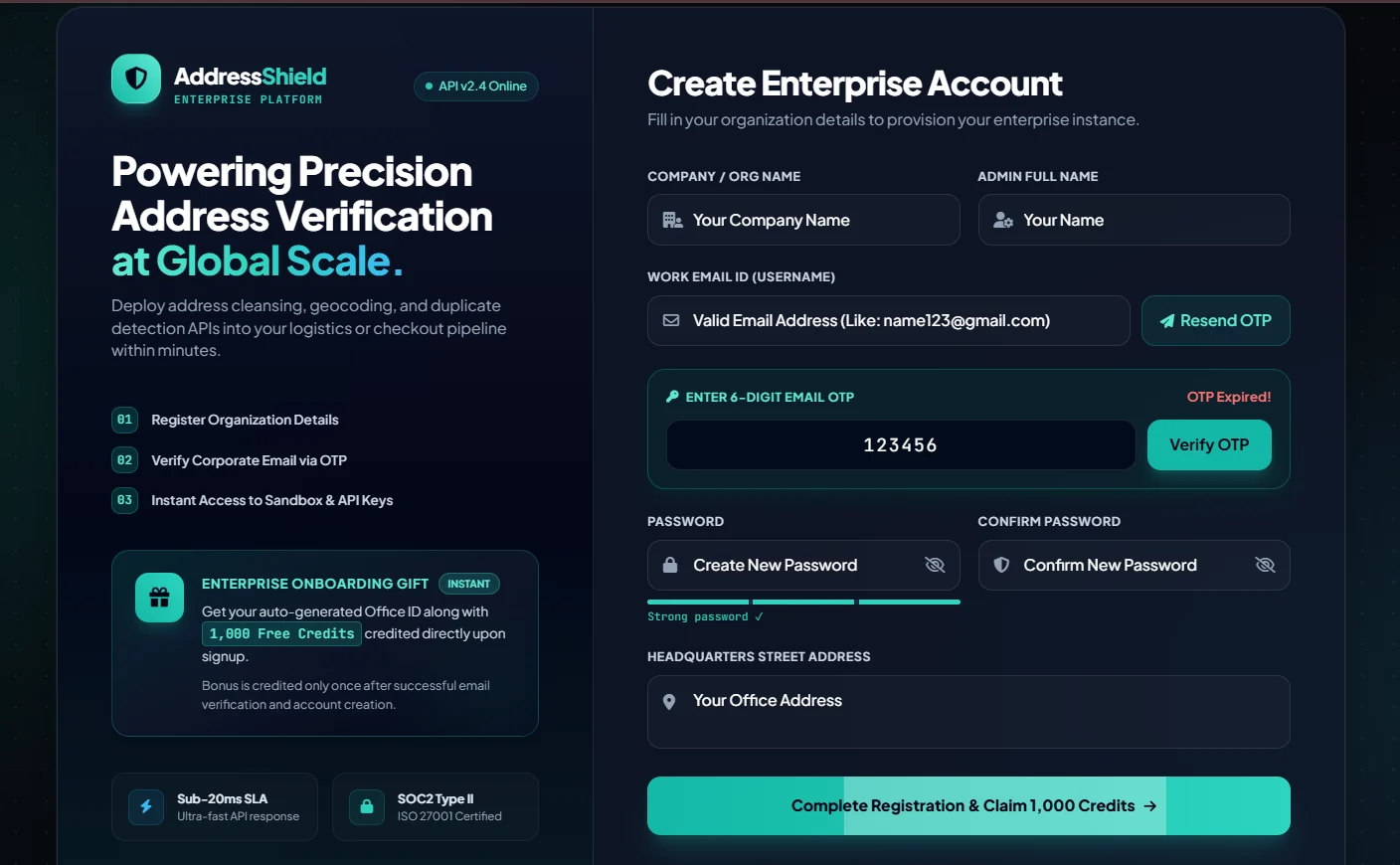
Verify the OTP and complete registration
Enter the OTP from your email, finish the password fields, and complete the registration. Your 1,000 free credits are added to your account automatically.
The bonus is credited once, after successful email verification and account creation. You will land back on the home page.
rto.nxtlift.in/register
Step 04
Log in to your dashboard
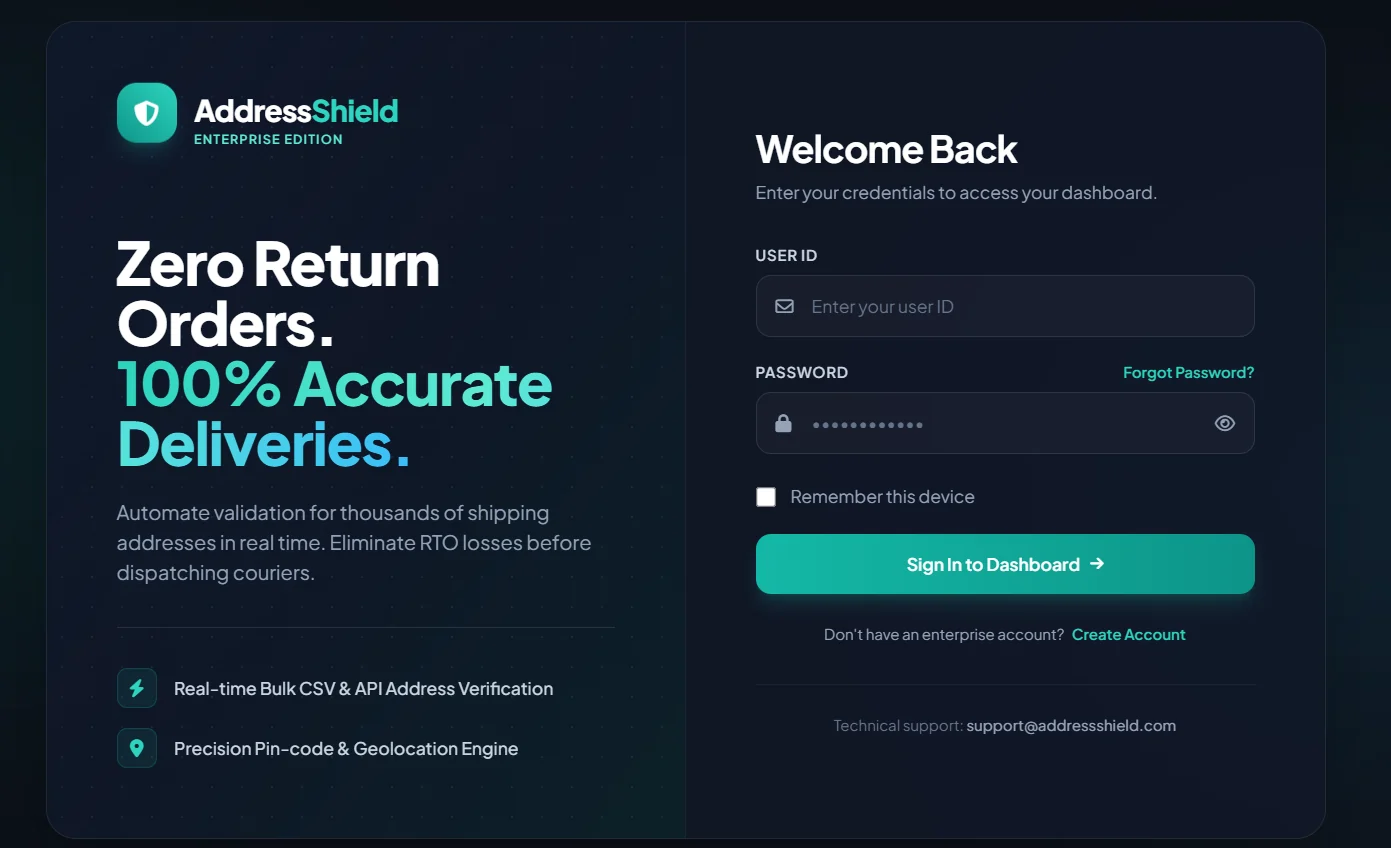
From the home page click Log in, then sign in with the email and password you just created.
1Enter your User ID (your registered email).
2Enter your password.
3Click Sign In to Dashboard.
Tick “Remember this device” on your own computer to skip logging in every time.
rto.nxtlift.in/login
Step 05
Open the Upload Addresses page
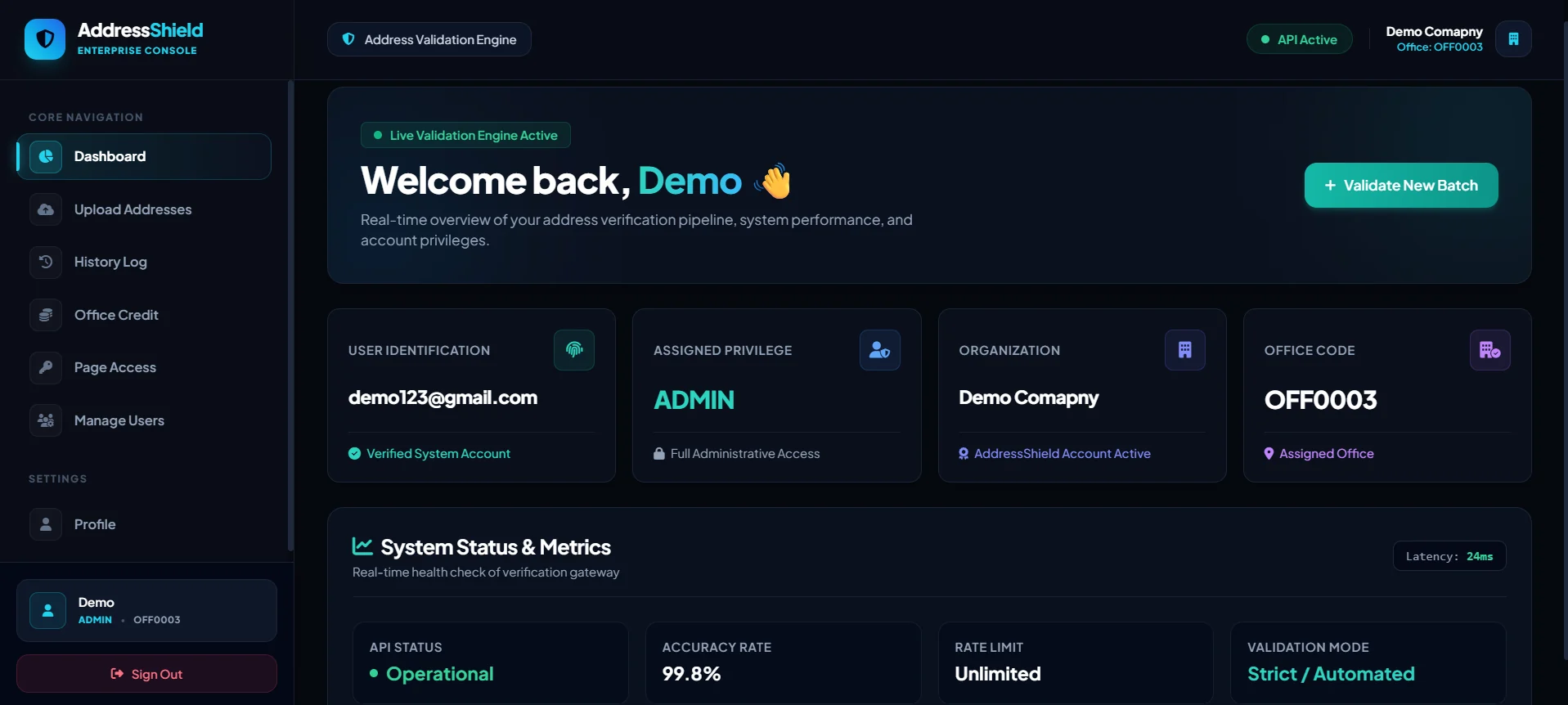
The dashboard shows your office code, privileges and live system status. To start checking addresses, go to the upload page.
1Click Validate New Batch, or
2choose Upload Addresses from the left menu.
rto.nxtlift.in/dashboard
Step 06
Download the sample Excel template
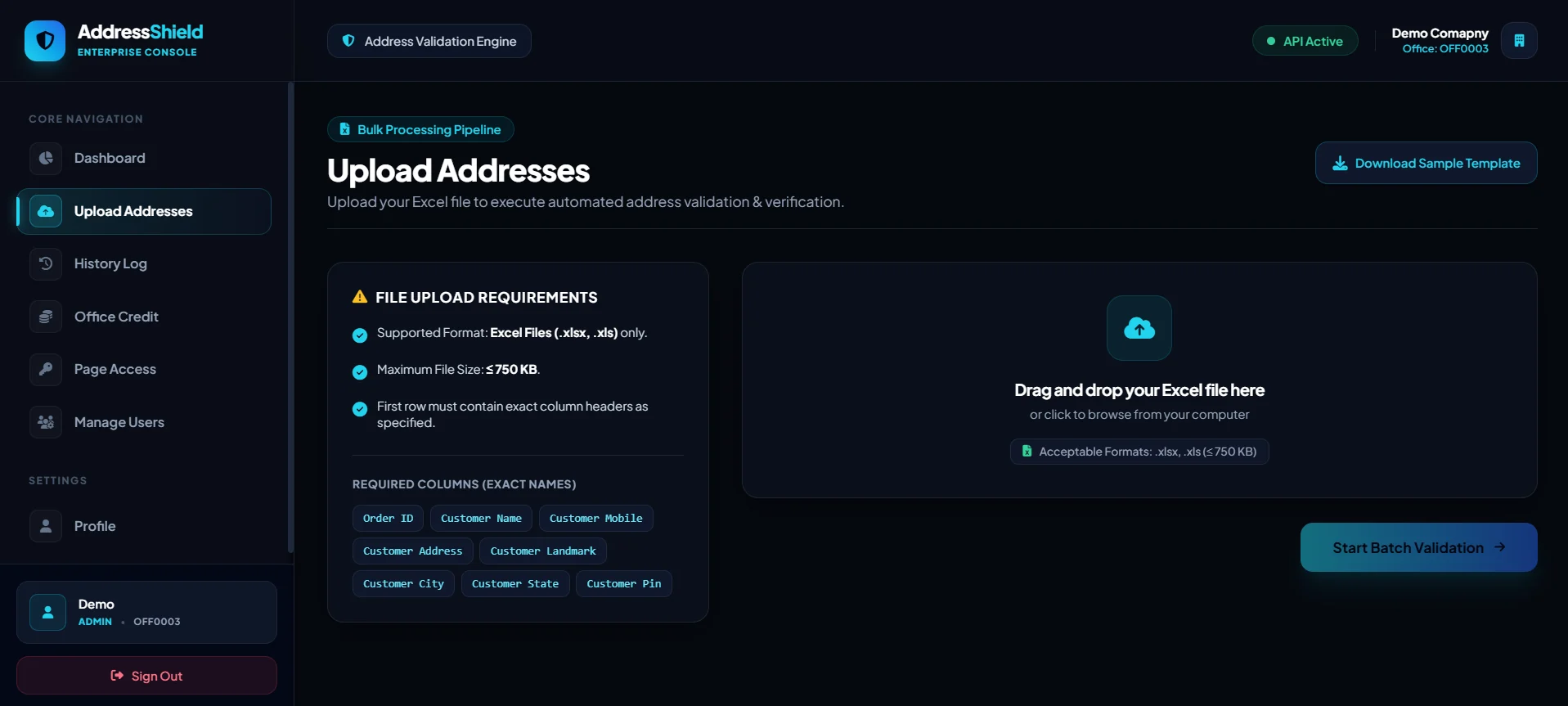
Your file must follow one simple format: Excel (.xlsx or .xls), up to 750 KB, with the exact column names in the first row. The easiest way to get it right is to start from our template.
1Click Download Sample Template.
2Check the required column names — they must match exactly.
Required columns: Order ID, Customer Name, Customer Mobile, Customer Address, Customer Landmark, Customer City, Customer State, Customer Pin.
rto.nxtlift.in/upload
Step 07
Fill your orders into the Excel sheet
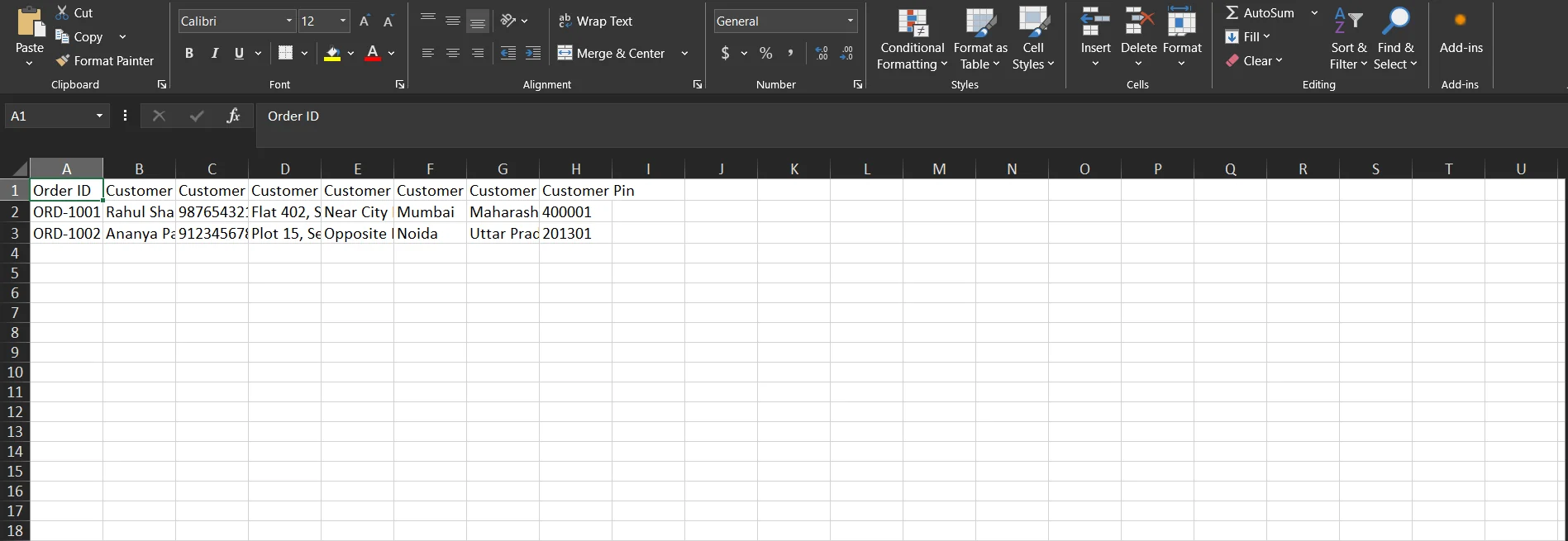
Open the template and paste your order details row by row. Export from your store or marketplace panel and map each field to the matching column.
1Keep row 1 (the headers) exactly as it is — do not rename or reorder the columns.
2Add one order per row below the headers, then save the file.
Fill the landmark whenever you have it. It helps the engine and the delivery partner find the exact location.
AddressShield_Upload_Template.xlsx
Step 08
Upload the file and check the live preview
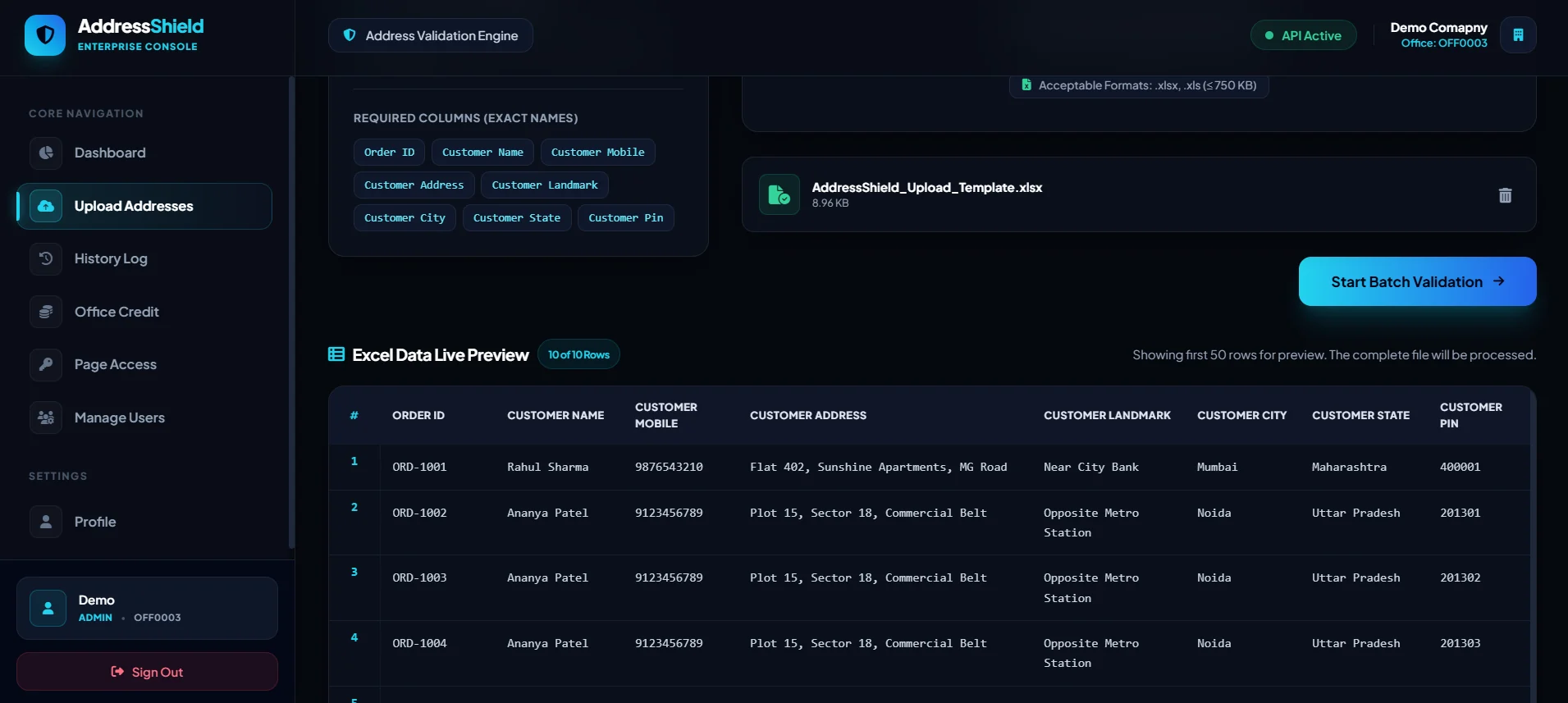
Drag and drop your Excel file onto the upload area, or click it to browse. A live preview of your rows appears so you can confirm the data looks right before processing.
1Confirm your file name and size.
2Review the preview, then click Start Batch Validation.
rto.nxtlift.in/upload
Step 09
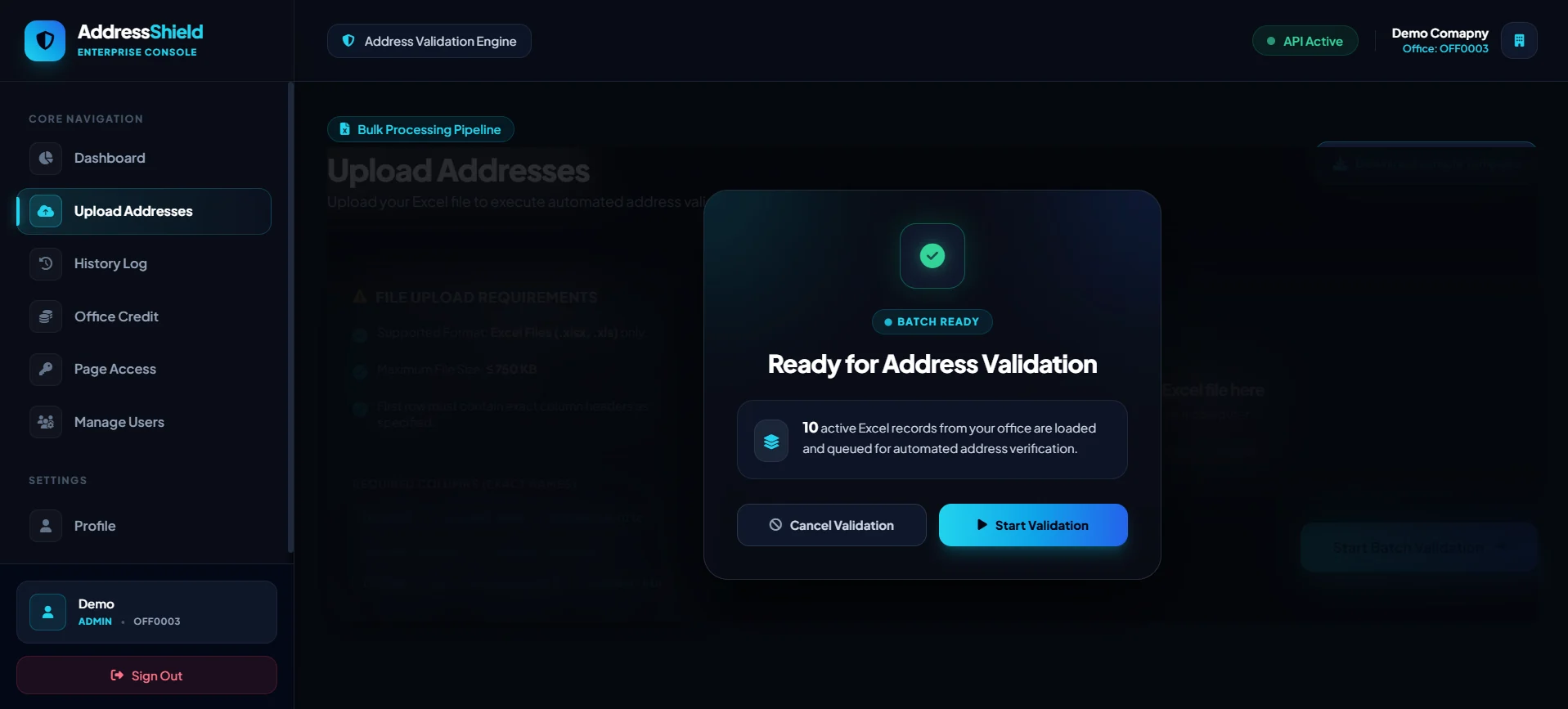
Confirm and start validation
A confirmation box shows how many records are loaded and queued for verification. You can still cancel here if you uploaded the wrong file.
1Check the number of records queued.
2Click Start Validation.
rto.nxtlift.in/upload
Step 10
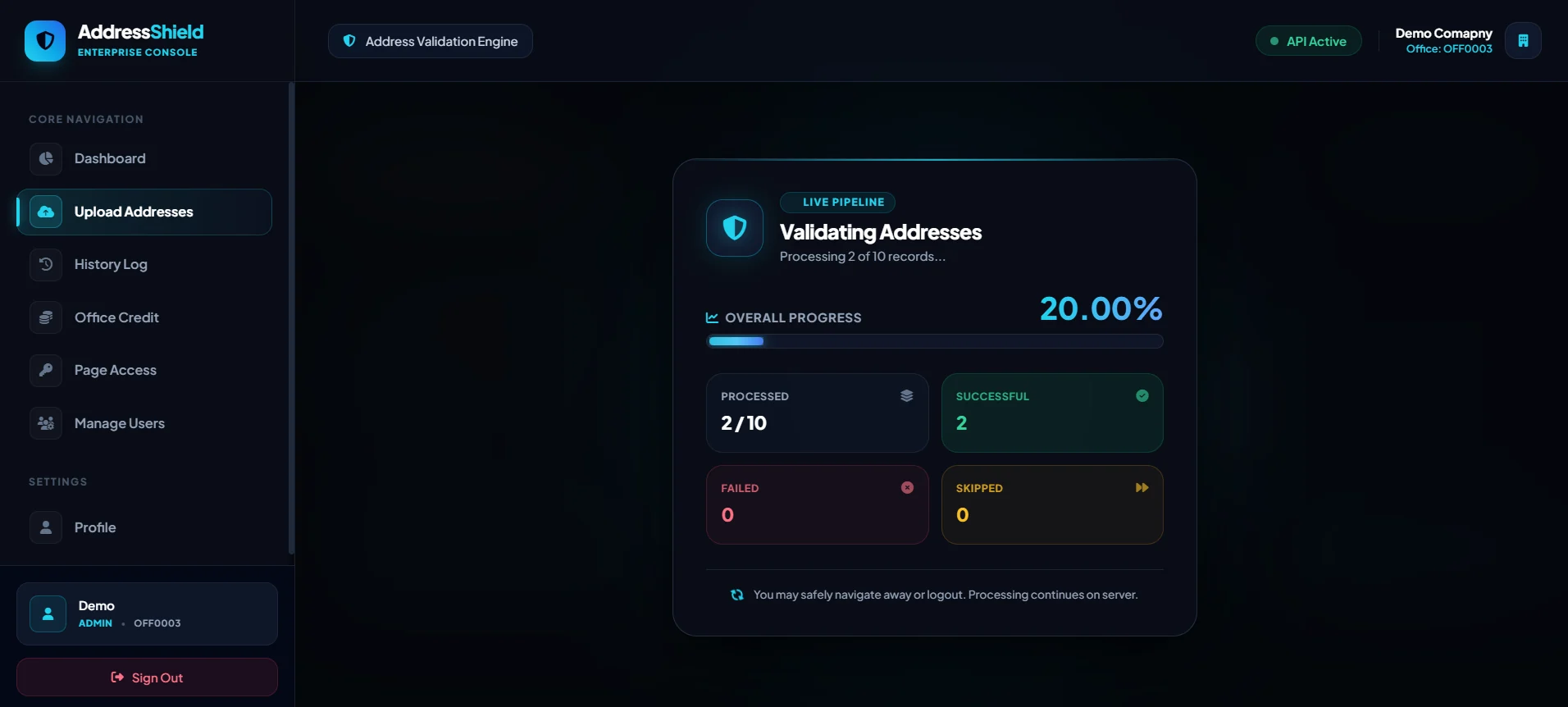
Watch the live progress
The live pipeline shows how many records are processed, successful, failed or skipped. Large files take longer, but you do not have to wait on this screen.
1Follow the overall progress bar.
2You may safely leave or log out — processing continues on the server.
rto.nxtlift.in/upload
Step 11
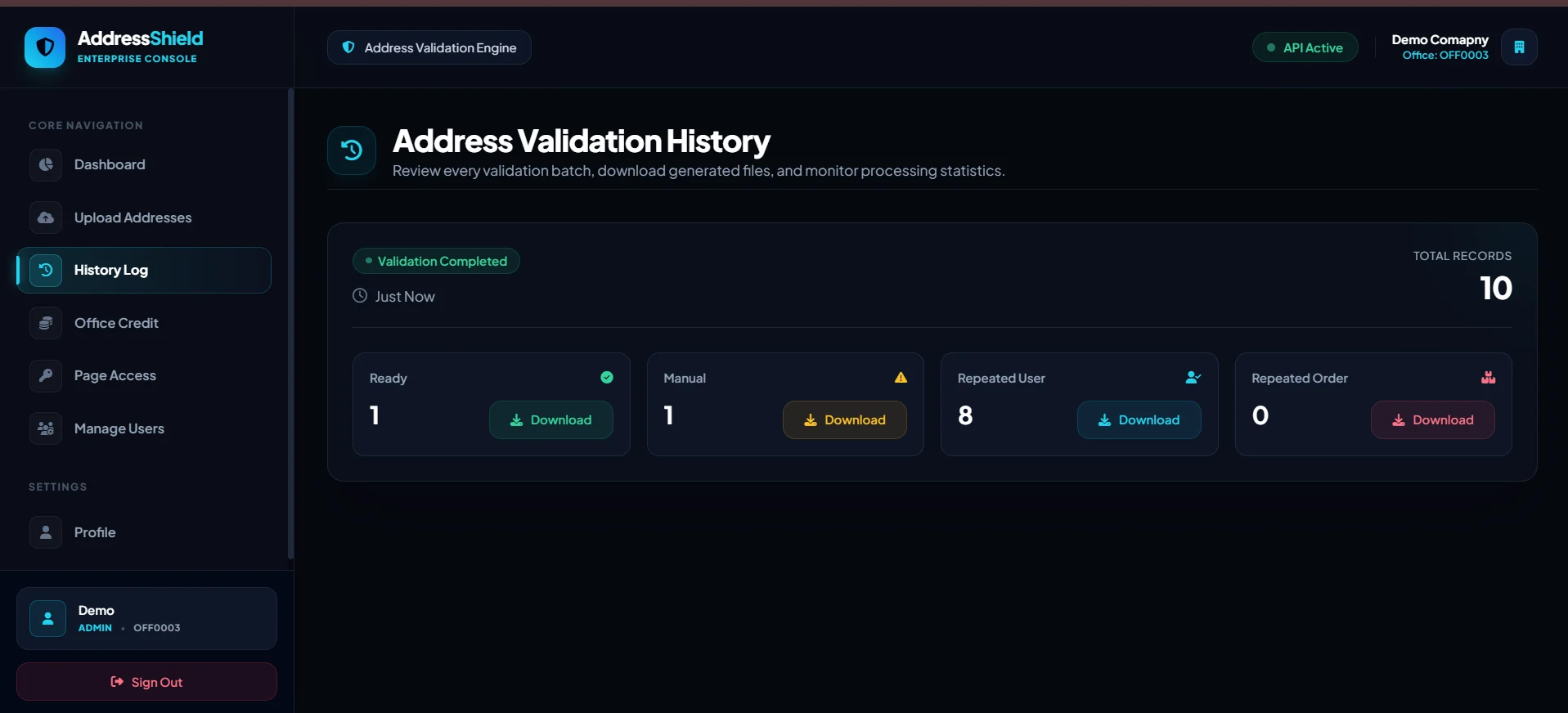
Download your results from History Log
When progress reaches 100% you are taken to the History Log automatically. Every batch is split into four downloadable files — each one tells you exactly what to do next.
1Ready — download and ship these orders.
2Manual — call the customer to verify first.
3Repeated User — same mobile ordered again within 15 days.
4Repeated Order — same order ID appears more than once.
rto.nxtlift.in/history
FAQ
Questions sellers ask us.
Can’t find your answer? Book a demo below or write to us at hello@nxtlift.in.
What does RTO mean?
RTO stands for Return to Origin. It is when a courier fails to deliver an order — because of a wrong address, an unreachable customer or a refused parcel — and the shipment comes back to the seller.
How does AddressShield reduce RTO?
It works before shipping. Each address is verified with AI, the India Post API and Google Maps, corrected, and rewritten so the delivery partner can read it easily. Addresses that look fake or incomplete, and repeat or duplicate orders, are separated so you can check them first.
Can it guarantee 100% delivery?
No tool can control what a customer does after an order is placed. What AddressShield does is remove the avoidable failures — wrong, incomplete, fake and duplicate addresses — which raises the delivery chance of verified orders to as high as 99%.
Is it free to try?
Yes. When you create an account on rto.nxtlift.in and verify your email, 1,000 free credits are added so you can test the platform on your own orders.
What file format do I need to upload?
An Excel file (.xlsx or .xls) up to 750 KB. The first row must contain these exact headers: Order ID, Customer Name, Customer Mobile, Customer Address, Customer Landmark, Customer City, Customer State and Customer Pin. You can download a ready-made template from the Upload Addresses page.
Does it support addresses in other languages?
Yes. The platform supports addresses across India, and addresses written in other languages are converted into readable English so your team and courier partners can use them.
Which courier or store platform does it work with?
Any. AddressShield works on a standard Excel file, so you can export orders from any store, marketplace panel or CRM, validate them, and hand the clean addresses to whichever courier you use.
Do I have to stay on the page while it validates?
No. Processing continues on the server, so you can leave the page or even log out. When the batch is complete, the results are waiting in your History Log.
Can my team use the same account?
Yes. Every organisation works under its own office code. Admins can add users from the Manage Users page and decide which pages each user can access.
Free live demo
See it on your own addresses.
Pick a date and time that suits you. We will walk you through AddressShield live and answer your questions about reducing RTO.
Book your demo
Fields marked with * are required.
Your demo is booked
——
Thank you, there. We have sent a confirmation with a calendar invite to your inbox. Our team will share the meeting details before the session.